 A discussion about the current state of YouTube view counts being ‘stuck’ started up amongst some online video professionals and it prompted me to rattle off some personal experience and knowledge on things that can help place your YouTube videos ahead of other. These tips are meant to help boost views on YouTube but ultimately ‘great content’ is the major thing that will help most.
NAMING IS HUGE
Abbreviate when you can and make sure to lead off with something catchy. Instead of a generic, “YOUR SHOW Season Two – Episode Two” – I suggest changing it to something more specific, with the perhaps the title of the episode itself— ‘Finding Treasure in the Amazon – YOUR SHOW 2.2’. This leads off with the episode name and still retains numbers in it (which will help YouTube recognize it as some type of series).
DESCRIPTION IS EVERYTHING
Use that description box to fill up as much info as you can – and all of that description text is searchable by Google . Make sure to include your episode title in the description (usually on the first line) and also include URL links to your last 3 episodes of the show (this will help YouTube put them on the right column suggestions as well as on the end of your video when it shows you ‘more choices’ to click on).
Subscribe to get the latest creator news
Feel free to go crazy in the description box — when I post video game reviews I go over to Wikipedia and copy/paste info directly from there and put it into my description box. Another ‘trick’ in the description field is to put entire sentences that you feel someone may be searching for that could relate to your show.
ANNOTATIONS ARE YOUR FRIEND
Know annotations on YouTube – love them! If you have a serialized web show then you should be linking to your previous episode and next episode. In the upper left corner you should have an annotation linking back to the previous episode the entire duration and in the upper right corner an annotation leading the viewer to the next episode (or a ‘coming soon’ saver – put a date in there if you know when!). Also, I would suggest putting a ‘Subscribe’ annotation button in the top center for the duration of the video as well. Make all of these small and look decent so you are not taking away from the viewing experience. I would highly suggest not making annotations that go along the bottom of a video because these can get easily covered up by lower-third ads.
TAGGING
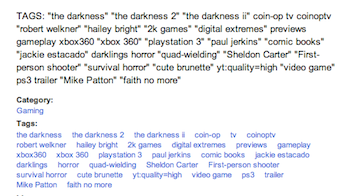 In the bottom of my description I put a list of tags that involve the show, cast, description, buzz words, etc – if it’s two words or a phrase use quotes. Feel free to go nuts here and include things like ‘fans of true blood’ and ‘blood suckers’ etc — some people also say that it’s good to include tags of misspelled words/actors names as well. Make at least 30 tags and then copy/paste them into the actual TAG box below. Having the tags in your description and in the tag box helps – trust me!
CUSTOM BANNER AND THUMBNAILS
As a bonus – if you are a YouTube partner you can make a custom banner and custom thumbnails. If you aren’t already a partner then you should submit and try to be one – be warned they’ll expect you to make regular content that is not copyright and adheres to their Terms of Service. I would suggest making a uniform theme as for graphics when you can—the most popular videos on YouTube tend to have very colorful thumbnails so that must play into the equation somehow—at least make them interesting to look at!
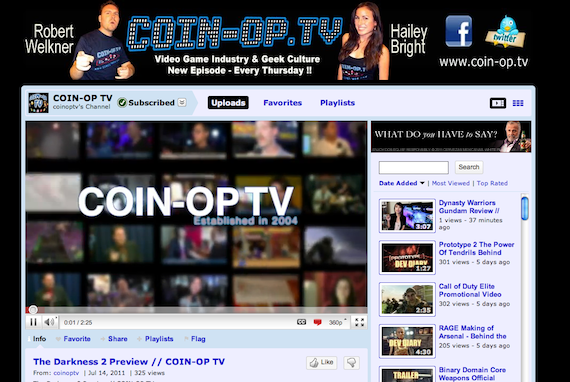
Happy hunting on YouTube. If you spend the weekend taking this advice then you’ll see overtime that your videos will pop up more frequently then others. It can be quite daunting getting ‘lost in the shuffle’ so be one step ahead of the game and think of YouTube more as a ‘search platform’ then a ‘viewing platform’. I’d like to add that most of this useful information came from my friends Black Nerd Comedy and Sam Proof – be sure to visit their YouTube channels for some great examples of what I illustrated above! If you have additional suggestions – leave ’em in the comments below!
Robert Welkner is a founding producer and host of COIN-OP TV